Showing posts with label tablet pc. Show all posts

8 Nov 2011

HP introduces multitouch Slate 2 tablet PC for business

HP announced the release of its HP Slate 2 tablet PC today. The offering throws the company's hat into the arena of the white hot tablet market while filling a niche need for its business-oriented customers.
HP Slate 2 tablet PC
The Slate 2 is a light-weight (1.5 pounds/680 grams) tablet which takes aim at the education, healthcare, government, and retail markets. The trait shared by all of these occupations is the need for a certain level of mobility, and being tied to a desk to use a computer or a POS (point of sale) system certainly hinders even the most able professional.
Featuring an 8.9-inch diagonal capacitive multitouch display that works with both touch and pen or stylus input, the Slate 2 is equipped with an Intel Z670 processor with mSATA SSM technology. This delivers fast boot times and a battery life rated at approximately six hours. The tablet also uses Swype keyboard technology, and offers 2GB of RAM and up to a 64GB SSD (solid state drive). The Slate 2 will also come with Windows 7 Professional pre-installed. Not to be overlooked, a 3MP outward-facing camera as well as an integrated VGA webcam allow for sharing of photos, videos, and even some conferencing ability.
HP Slate 2 tablet PC-2
Designed to be secure as well as functional, the Slate 2 offers a variety of security measures to keep the data of your business, clients, or patients from prying eyes. For starters, a TPM Embedded Security Chip protects your data by locking down anything from email to spreadsheets. The TPM chip is bound to a single platform and works independently of all other components on the platform, such as the processor, memory, and operating system. The system also has the ability to allow its users to delete all data remotely, which could prove useful for stolen or misplaced tablets. Add to this the HP Connection Manager, which monitors and controls all incoming and outgoing connections (Bluetooth, 3G internet, Wi-Fi, and Ethernet), and you've got the makings of a secure tablet.
As far as connectivity goes, the Slate 2 has one USB 2.0 slot as well as the standard stereo headphone/mic jack and an integrated microphone, as well as the power connector on the bottom which doubles as an output device for the Slate Cradle connector. The connector allows the Slate 2 to utilize additional accessories and business solutions, such as the HP Retail Mobile Point of Sale case which has a magnetic stripe reader for scanning credit cards and a barcode scanner that allows for easy inventory control.
The Slate 2 starts at USD $699 for the 32GB model, or USD $799 for the 64GB edition. The specs - other than the hard drive - are identical on both units.
Via GIZMAG
»»  read more

5 Oct 2011

Aakash the "world's cheapest" tablet computer for $35

NEW DELHI (Reuters) - India unwraps what has been dubbed the world's cheapest tablet computer on Wednesday, to be sold to students at the subsidized price of $35 to expand digital access in the Asian giant that lags peers such as China and Brazil in connectivity.
The government says the device, called Aakash, which means sky, will initially be available in a pilot run of 100,000 units before being rolled out to millions of students over the next few months.
"Soon, a $35 computer will be made available to every child in school. The tablet shall help enhance the quality of learning of children," Telecoms and Education Minister Kapil Sibal told reporters last week.
The tablet will be officially launched later on Wednesday, by the minister and DataWind, the small British-based company that developed it. The expected price tag is 1,750 rupees.
Two years in development, the Aakash is due to be assembled in India and may help the government's goal of incorporating information technology in education, although critics were doubtful the device would live up to expectations.
India trails fellow BRIC nations Brazil, Russia and China in the drive to get its 1.2 billion population connected to technologies such as the Internet and mobile phones, a report by risk analysis firm Maplecroft said this year.
The number of Internet users grew 15-fold between 2000 and 2010, according to another recent report. Still, just 8 percent of Indians have access. That compares with nearly 40 percent in China.
Some 19 million people subscribe to mobile phones every month, making India the world's fastest growing market, but most are from the wealthier segment of the population in towns.
Bharat Mehra, an expert on the use of communications technology for development, said the budget tablet could be used to deliver distance learning in rural areas and among students.
"If they are able to deliver what they promised it will make a huge difference," said Mehra, who teaches at the University of Tennessee.
The launch last week of Amazon's Kindle Fire shook up the global tablet market, with its $199 price tag and slick browser a serious threat to Apple Inc's iPad.
Like the Kindle Fire, the Aakash uses the Google Android operating system, but market watchers were skeptical the Indian-made device will have mass appeal.
Full specifications were not available pre-launch, but low-end devices often use resistive LCD displays rather than full touch screens. Media reports said the device will connect via wireless broadband, unavailable in most areas.
"The thing with cheap tablets is most of them turn out to be unusable," said Rajat Agrawal, executive editor at technology reviewers BGR India. "They don't have a very good touch screen, and they are usually very slow."
(Additional reporting by Annie Banerji and Devidutta Tripathy; Editing by Paul de Bendern and Ron Popeski)
»»  read more

21 Aug 2011

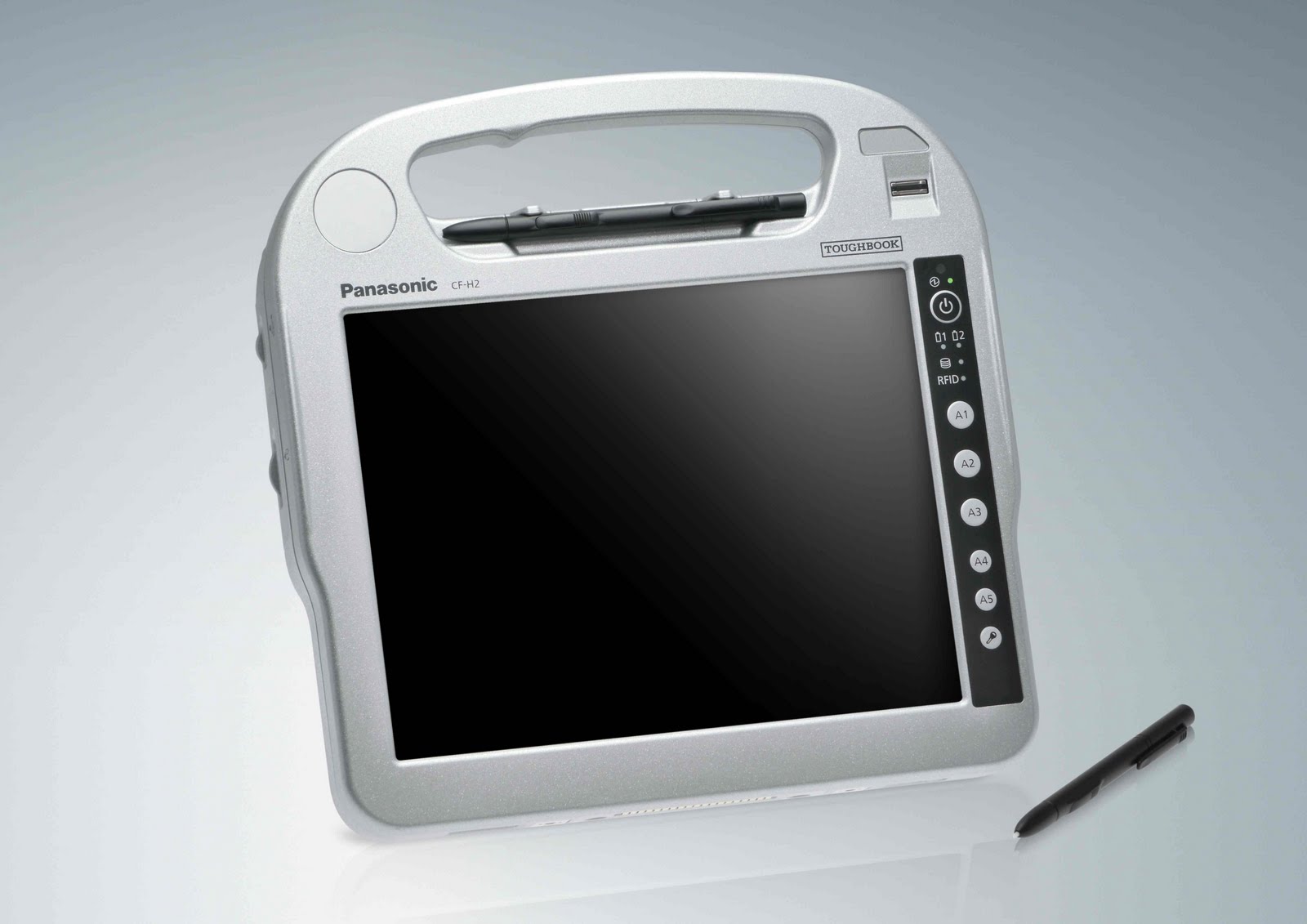
The industry's most rugged handheld tablet PC

The new rugged Panasonic Toughbook® H2 handheld tablet PC runs a full OS (Windows(R) 7 Professional) and is the ultimate productivity tool for mobile workers. With superior ergonomics, a brilliant 10.1" sunlight-viewable LED screen capable of up to 6000 nit in direct sun and sealed all-weather design, the H2 lets you work virtually anywhere. Designed with a fast Intel® Core™ i5 vPro™ processor*, magnesium alloy chassis encased in polycarbonate, the IP65 and MIL-STD-810G certified(1) Toughbook H2 delivers a complete range of embedded wireless features including Wi-Fi, Bluetooth® and optional 4G LTE (Fall 2011) or Gobi™2000 3G mobile broadband. Add to that hot-swappable twin batteries for maximum uptime, ports such as USB, serial and ethernet, optional integrated barcode and SmartCard readers, and you’ve got a handheld tablet PC that is unmatched in the field.
toughbook h2 pic1
Unique Technology
The Toughbook H2 was created to be the kind of tough slate computer that helps busy mobile workers do their job efficiently. With a dual touch display, stylus data entry, sunlight-viewable display, Wi-Fi and Bluetooth® wireless communications functions, it is effortless to update patient data on the go. In addition, the H2's special rugged design means it is durable and easily sanitized.
TransflectivePlus Display
The Panasonic Toughbook H2 features a TransflectivePlus display, which in addition to an adjustable LED backlight, harnesses the rays of the sun by using an internal reflecting layer to illuminate the screen and can generate up to 6000 nit of LCD brightness in direct sunlight for superior viewability. The supplementary LED backlight can deliver as little as 1 nit, useful in dimly lit areas or up to a full 500 nit, which is comfortable in normal viewing conditions. This brilliant and exclusive technology comes standard with anti-reflective and anti-glare screen treatments plus a circular polarizing filter for an unparalleled outdoor viewing experience. The Toughbook H2 is also equipped with an ambient light sensor to detect bright lighting conditions and automatically disable the LED backlight to conserve power, thus extending battery life when outdoors.
Hot-Swappable Twin Batteries
In your line of work, every second counts. The H1 Field is equipped with an impressive 6.5 hours of battery life, which can be extended further by taking advantage of its hot-swappable twin battery design. With its hot-swappable design, the H1 Field comes standard with two identical batteries. This design can provide unlimited hours of use by giving users the ability to change one of the H1 Field's batteries with the unit still on. By avoiding the need to shut down to change a battery, critical time can be saved.
touchbook h2 back and front view
Ergonomic Strap and Dome Hand Support
The Toughbook Toughbook H2 was also designed to be used while standing during shifts whether indoors or outdoors. That's why it features an ergonomic strap and dome hand support.
This strap is wider in the middle and uses a urethane material, which provides elasticity, as well as a comfortable fit that is not too tight. In addition, the bottom of the PC is designed with a contoured dome that envelops your palm to provide the support you need for comfortable long-term use. The dome on the bottom of the PC was designed with the hand in mind as the hand forms a cup shape naturally when it is relaxed. These innovative designs enable the PC to be held for long periods without fatigue.

Fanless Design
Engineered to be used outdoors, the H2 employs a smart construction to protect it from moisture and debris. A fanless design means there's no need for a vent, while locking port covers protect the interface connectors. So whether it's exposed to spills, humidity or dusty environments, the H2 can survive it all.

Magnesium Alloy Chassis
The H2 strikes just the right balance between ruggedness and mobility. Its body is fabricated from lightweight but extremely strong reinforced polycarbonate that has 200 times more impact strength than glass and 6 times more than acrylic resin. Inside, the PCB is protected by a magnesium alloy plate that has been proven to withstand 3 foot drops. Weighing in at just 3.5 pounds, the H2 is light enough to carry around, yet strong enough for all those bumps along the way.
touchbook h2, pic 3
Reinforced Locking Port Covers
Computer sockets are direct openings that invite interior damage from water and particles. To decrease this risk, Panasonic designed a secure interface cover specifically for the Toughbook H1. Generously coated with a durable resin to ensure firm contact and excellent sealing, the cover features a catch that slides it into position and locks it into place which prevents the cover from opening accidentally.

Gobi™ Mobile Broadband
With new Gobi™ mobile broadband technology from Qualcomm, Panasonic Toughbook® mobile computer users can connect globally using Panasonic's next-generation wireless computers. Users can take advantage of high-speed 3G mobile internet networks to increase productivity and reduce downtime, while securing a reliable connection virtually anywhere a cell phone can be used. And, with the Panasonic Carrier Selection Application (CSA) software platform, users are able to select or change to the best carrier for any geographic area.
The Toughbook ROI Evaluator
The Toughbook ROI Evaluator is an application that objectively analyzes the costs/benefits of mobile computing solutions from different vendors. This vendor-neutral application is designed to help purchasing managers choose a solution that provides the best ROI (Return On Investment) and TCO (Total Cost of Ownership) based on their unique business needs. It performs a detailed cost analysis of up-front purchase cost, repair expenditures and downtime, specific product features, value of ownership, disposal, and much more.
»»  read more

1 Aug 2011

Samsung Galaxy Tab 10.1 Wi-Fi / Review

Samsung Galaxy Tab 10.1 Wi-Fi
The Samsung Galaxy Tab 10.1 Wi-Fi is the first Android tablet to mount an effective challenge to Apple's iPad 2 in the area where Apple does best: design. And let's face it, where tablets are concerned, design occupies center stage. Happily for Samsung, the Tab 10.1--available in limited distribution starting today, starting at $499 for a 16GB version--parlays its design and its Android 3.1 operating system into a machine that vaults to the head of the Android pack.
The Tab 10.1 achieved perhaps the best design compliment an Android tablet could hope for--often being mistaken by passers-by (including Apple iPad users) for an iPad 2. The confusion is understandable when you see and hold the Tab 10.1 for the first time. It has a slim profile of 8.6mm (0.34 inch)--a hair's breadth slimmer than the iPad 2's 8.4mm depth.
From the side, the two tablets look very similar. The Tab 10.1 edge is more rounded, though, while the iPad's is tapered. The tablet comes in two colors: Shipping first is the White model, which couples a silver-painted plastic edge with a white plastic back (identical to the limited edition Google I/O version of the Tab, but without the Android graphic imprint); available on June 17, when the Tab 10.1 is slated to ship in volume, will be a Metallic Gray alternative, with edges and back that more closely match.
The Tab 10.1 weighs slightly less than the iPad 2, as well, at 1.25 pounds versus the iPad 2's 1.33 pounds. And it stands slightly taller and narrower than iPad: 10.1 by 6.9 inches, as against the iPad 2's 9.5 by 7.3 inches.
Using it
The Tab 10.1 feels lightweight and extremely well balanced; I found it comfortable to hold in one hand or two, and it weighed so little. This model is Samsung's first mass-market tablet of this size.
The Tab 10.1 takes minimalist design cues from Apple, as well. Beyond the docking port, it offers a power button and volume rocker at the top (in horizontal orientation) or along the right side (when held vertically). Also along the right top is the headphone jack; it's awkwardly situated if you hold the tablet horizontally and engage in video chat at the same time, because the jack is just above and to the right of where the camera is. But if you flip the orientation to put the jack at the bottom of the horizontal display, or if you hold the tablet vertically with the jack running along the right side, the jack's location works fine).
The stereo speakers are situated a little more than an inch down from the top, along the left and right horizontal edges. The speakers were above average for an Android tablet sound system, and far better than the iPad 2's single rear-facing speaker. But audio still sounded too tinny on my test tracks.
The 1280-by-800-pixel-resolution display looked bright and brilliant, two characteristics we've come to associate with Samsung's phone and tablet displays. Like the 7-inch Galaxy Tab before it, the Tab 10.1 has a display that tends to oversaturate colors. On a color-chart test image, most of the colors, including reds and blues, were blown out. In our test images of sights and scenes, images popped but had a bit too much red and blue in the mix. In side-by-side comparison, the Apple iPad 2 generated better color reproduction, especially when in the soft browns of skin tones.
Still, the Tab 10.1 rendered images with terrific sharpness and detail. This is the first Android tablet to ship natively with Google's Android 3.1 update, and images clearly benefited from the updated OS, looking crisp and lacking any sign of the fuzzy rendering issue that plagued earlier Honeycomb versions.
Inside the Galaxy Tab 10.1
Like other Honeycomb tablets, the Tab 10.1 runs Nvidia's Tegra 2 platform, with a dual-core 1GHz processor and 802.11a/b/g/n Wi-Fi. The Tab 10.1 has many of the now-standard tablet accouterments like rear- and front- facing cameras (3- and 2-megapixels, respectively, with rear flash), a gyroscope, an accelerometer, a digital compass, and an ambient light sensor.
The Galaxy Tab 10.1 Wi-Fi's specs have changed--for better and for worse--since its introduction at CTIA a few months ago. Most notably, the weight has decreased from 1.31 pounds to 1.24 pounds. Unfortunately, that weight reduction might be due to the now-departed microSD card slot--a disappointing late scratch in an area that would have given the Tab 10.1 a significant advantage over the iPad 2. Also missing so far is any mention of a 64GB version, which Samsung had previously announced was in the works.
The Tab 10.1 supports Adobe Flash, but my test unit came without Flash preinstalled. Nor did the unit have a shortcut on the desktop linking directly to Adobe's Flash Player on the Android Market, as other Honeycomb tablets have done to handle the Flash installation conundrum
 The Tab 10.1 supports Windows Media audio and video files (including .WMA, .WMV, and .AVI)--formats that Android 3.1 doesn't natively support--so Samsung deserves credit for jumping in to the fill the void here. The Tab 10.1 can also read Xvid, another format not cited on Android's official list.
The Tab 10.1 comes preloaded with Quickoffice HD, for reading and editing Microsoft Word, Excel, and PowerPoint files and for file browsing.
As shipped, the Tab 10.1 comes with the stock Android 3.1 OS on board, with very little customizing. The Tab 10.1 is the first Honeycomb tablet to ship with Google's facile Android Movie Studio (Google's answer to Apple's iMovie on iOS). In addition, it offers a customized keyboard from Nuance, with trace typing capabilities.
Samsung's more customized overlay, TouchWiz UX, will be available later this summer as an over-the-air update. It will add various interface customizations to improve Android 3.1's usability. It will also add Samsung's Media Hub movie and TV purchase and rental service, along with Reader Hub (powered by Kobo Books and Zinio) and Social Hub (for accessing social networks under one roof).
Cons
To achieve its slim and light design, Samsung's Galaxy Tab 10.1 Wi-Fi accepts some compromises that may temper its appeal, depending on your needs. Like the iPad 2, it has no ports beyond its docking port, which is centered along the horizontal bottom edge. To add connectivity, you must invest in the optional dongles due to arrive later this month.
Samsung will have docking port dongles to add USB, SD Card, and HDMI, but all of these feel like the afterthoughts they are. It would be nice to get to a point where at least HDMI and USB connectivity are integrated directly into the tablet. Many competitors in the red-hot tablet space build in at least one such port--but those competitors are also far heavier, at 1.5 to 1.65 pounds.
 The 7000-mAh battery took inordinately long to charge. After 2 hours plugged in, my test unit had reached only about 30 percent charged. The battery is rated for up to 9 hours of use.
Bottom Line
It matches iPad 2 in design, price, and even that intangible IT factor. Its decision to sacrifice ports is disappointing but not a dealbreaker; heck, Apple's been doing the same thing from the outset. It's more difficult to find tablet-optimized apps at Google's Android Market than at Apple's App Store does, but again, that may not be a dealbreaker. If neither of those constraints faze you, the Galaxy Tab 10.1 may be a good match. It certainly is one of the top tablets available today. And it becomes the flagship Honeycomb tablet for showcasing what Android 3.1 can do.
»»  read more
Related Posts .