Showing posts with label Latest Gadgets. Show all posts

28 Nov 2011

Belkin LiveAction (special gadgets)

Belkin LiveAction Camera
Price: $49.99
The Belkin LiveAction Camera Grip will be accompanied by the LiveAction Camera Remote and will feature a contoured, soft-touch design and an external shutter button, turning your iOS device into a digital camera so that you can shoot images in the traditional method – by pressing a physical button.
The Camera Grip will be connected to the charge connector of the device, where it ought to be able to fits easily over the majority of cases. As for the integrated tripod mount, it will attach itself to any standard tripod to deliver you a more stabilized control. There will be separate buttons for photo and video recording, and it will play nice with the iPhone 4, iPhone 4S, and iPod touch.
»»  read more

19 Oct 2011

Motorola Reveals Droid Razr: 'World's Thinnest Smartphone'


The Motorola Droid Razr, a Google Android powered gadget that the company claims is the world's thinnest smartphone.
Motorola Mobility revived its once best-selling Razr brand to tout its latest gadget, the Droid Razr, as the world's slimmest smartphone.
The company, which has agreed to be bought by Google for $12.5 billion, hopes to compete with arch-rival Apple's iPhone when it kicks off pre-orders at Verizon Wireless on October 27.
But the device, which sports a more powerful chip than the iPhone and a higher-speed wireless connection, costs $299 -- far more than $199 for the latest basic iPhone 4S.
NPD analyst Ross Rubin said that while the phone could put a dent in iPhone sales at Verizon Wireless, it would be unlikely to sell as many as Motorola's previous Razr, which sold more than 130 million units.
Only about 10 percent of U.S. consumers would buy a $300 phone, Rubin said. "That's a relatively small part of the market. At $199, it would be an explosive seller."
Outside of the U.S. market, the device will simply be called Razr. Motorola hopes to rekindle the popularity of its original Razr, which was the thinnest flip phone on the market when it debuted in 2004.
Motorola also introduced MotoActv, a combined music player, performance tracker and GPS device aimed at fitness enthusiasts. This device will start at $249 for an 8 Gigabyte version. A 16 GB model will cost $299, Motorola said.
Motorola uses Google's Android software to power its smartphones. The Droid Razr, sporting Corning glass, will be able to download movies from Netflix and comes with front-facing and back-facing cameras.
The phone, unveiled days after Apple's iPhone 4S hit markets, is the latest iteration of a line-up that helped stage a recovery for Motorola after years of market share losses.
Motorola's Razr was the most successful phone brand in the company's history. The height of its popularity was from late 2004 until late 2006, when the device started to lose its luster amid tough competition and heavy carrier discounts.
That led to years of market share losses as Motorola failed to come up with another hot device to replace Razr, after having focused on the brand for too long.
Motorola started to turn around in late 2009 with the launch of its first Droid phone sold through Verizon Wireless.
(FOXNEWS)
»»  read more

5 Oct 2011

Apple unveils faster, more powerful iPhone

 Apple CEO Tim Cook speaks at the event introducing the new iPhone 4s at the company’s headquarters October 4, 2011 in Cupertino, California. October 4, 2011 in Cupertino, California. (Photo by Kevork Djansezian/Getty Images)

CUPERTINO, Calif. (AP) — Apple Inc. unveiled a new iPhone on Tuesday that is faster and more powerful but stops short of a more radical upgrade. It said Sprint customers will now be able to use one.
The new iPhone 4S has an improved camera with a higher-resolution sensor. The processor is faster, which helps run smoother, more realistic action games. It's also a "world phone," which means that Verizon iPhones will be able to useable overseas, just as AT&T iPhones already are.
There had been speculation that Apple would reveal a more radical revision of the phone, an "iPhone 5." The no-show leaves room for speculation that Apple will reveal a new model in less than a year, perhaps one equipped to take advantage of Verizon's and AT&T's new high-speed data networks.
There had also been speculation that Apple would include a chip that could talk to payment terminals at retail stores, turning the iPhone into a "mobile wallet." Competitors are starting to include this capability in their phones, though the payment systems are still immature. Apple made no mention of such a feature in the iPhone 4S.
Apple's Senior Vice President of Worldwide product marketing Phil Schiller discusses the new iPhone 4s at the company’s headquarters October 4, 2011 in Cupertino, California. (Photo by Kevork Djansezian/Getty Images)
Apple is including a "personal assistant" application called Siri in the iPhone 4S. It responds to spoken questions and commands such as "Do I need an umbrella today?" It's an advanced version of speech-recognition apps found on other phones.
The new iPhone also comes with new mobile software that includes such features as the ability to sync content wirelessly, without having to plug the device to a Mac or Windows machine.
The iPhone announcement came during Apple's first major product event in years without Steve Jobs presiding. New CEO Tim Cook led the show after Jobs, who has been battling health problems, resigned from the post in August.
Cook, wearing a navy blue button-down shirt and jeans, opened by calling his nearly 14-year tenure at Apple "the privilege of a lifetime." Those in the audience clapped as he entered, but the reaction seemed more muted than what Jobs had recently received.
Cook said the latest iPhone, which came out in June 2010, sold more quickly than previous models, but the iPhone still has just 5 percent of the worldwide handset market. Apple is hoping to grow that with the new model.
 Apple CEO Tim Cook gestures during the announcement at Apple headquarters in Cupertino, Calif., Tuesday, Oct. 4, 2011. (AP Photo/Paul Sakuma)
Apple's new mobile software, iOS 5, will also be available on Oct. 12 for existing devices — the iPhone 4 and 3GS, both iPad models and later versions of the iPod Touch.
Apple said Oct. 12 will also mark the launch of its new iCloud service, which will store content such as music, documents, apps and photos on Apple's servers and let people access them wirelessly on numerous devices.
Apple said the new phone will come in black or white. It will cost $199 for a 16 gigabyte-version, $299 for 32 GB and $399 for 64 GB — all with a two-year service contract requirement. It will now be available through Sprint Nextel Corp., besides the existing carriers, AT&T Inc. and Verizon Wireless.
Pre-orders will begin Friday with availability on Oct. 14.
The previous version, iPhone 4, will now cost $99 for 8 GB. The 2009 model, the iPhone 3GS, will be given away for free with 8 GB. Both also require a two-year service contract.
Apple also touted the popularity of its products and unveiled a new line of iPods, including a Nano model with a multi-touch display that promises to be easier to navigate. Apple made no mention of its Classic model, which many people had speculated the company might discontinue.
The event took place in Apple's Town Hall room, where the first iPod was launched a decade ago. Cook said Apple has sold more than 300 million iPods worldwide so far, including 45 million in the 12 months through June.
The iPhone came six years later and has gained millions of fans, thanks to its slick looks, high-resolution screen and intuitive software. There were 39 million iPhones sold in the first six months of this year.
Apple's stock fell $17.15 to $357.45 in afternoon trading Tuesday.
»»  read more

30 Sept 2011

Acer reveals Aspire S3 Ultrabook/ Review

Acer has announced its first dip into the Ultrabook market at this year's IFA. A more obvious leaning towards the trend-setting MacBook Air design than Toshiba's Portégé Z830 notebook, the Aspire S3 will come with a choice of second generation Intel Core processors, either solid state or hybrid hard drive storage and promises an impressive battery life. We got up close and personal with the pre-production models on show in Berlin, but were left less than impressed.

Externally, the light aluminum/magnesium alloy chassis and the fingerprint-free metal finish lid of the new Aspire S3 from Acer certainly gives it the look of Apple's classy, super-thin notebook. Despite this durable appearance, we found that there was a lot of "give" in numerous places and the frequent handling by tech journalists had taken its toll on the hinge of one of the show models, too, which was very loose and caused the upper lid to fall backwards of its own accord. Such issues may be rectified in the production models, but it's something to keep in mind.
The S3 is somewhat thinner than the MacBook Air, and even manages to beat Toshiba's svelte appearance by a couple of millimeters - coming in at just 13 mm (0.51-inch). It's not as light as the Portégé Z830, but still occupies a light featherweight position at just 3 pounds (1.4 kg).
The Aspire S3 has a 13.3-inch, high definition, LED-backlit display and will be powered by a choice of Intel Core i3/i5/i7 processors, with storage offered as either a 240GB SSD or 320GB/500GB HDD with embedded SSD to cater for fast startup. Acer is making a big play over its Acer Green Instant On technology, which may result in users putting their S3's into sleep rather than switching off given that standby battery life is claimed to be in the region of 50 days.
If the Ultrabook is just having a light snooze, Instant On is said to wake the device to full operation in just 1.5 seconds, while a Deep Sleep takes a touch longer at 6 seconds. Acer goes on to say that Instant Connect will get users online in a super fast 2.5 seconds. Once up and running, the battery is claimed to offer some 7 hours of usage between charges.
A new airflow design (including fan optimization) is said to dissipate warm air away from the rear of the notebook, Acer saying that any warm components have been positioned away from where the user has contact with the notebook so users won't feel any heat discomfort.
Other specs detailed include cinema-style surround sound audio courtesy of Dolby Home Theater v4, an integrated 1.3 megapixel webcam for high resolution video conferencing or online chat over an 802.11b/g/n wireless connection, Bluetooth 4.0, a 2-in-1 media card reader, a full-size HDMI out port and some USB ports.
The Aspire S3 Ultrabook also features a full-size chiclet-style keyboard, which we found rather strange to use because of the short travel to the keys. We also noticed that the steady stream of IFA attendees wanting to get their hands on Acer's new baby had left its mark on the space bar on one of the demonstration units, which barely functioned at all. The plastic trackpad that sits underneath also left us seriously wanting given the spacious glass offering on the MacBook Air.

»»  read more

29 Sept 2011

Special Gadgets/Wacom Inkling

We've been waiting a long time for the "digital sketchpad" to become reality — and as cool as tablets are, they haven't really been able to nail it. But the Wacom Inkling ($200) looks like it has. It includes a small receiver that attaches to any sketchbook or normal piece of paper and an electronic sketch pen that work together to record your sketches stroke-by-stroke, which can then be transferred over USB and into Photoshop, Illustrator, Sketchbook Pro, or any number of traditional image formats
»»  read more

Samsung Omnia W Mango-based smartphone to hit the shelves in October

Samsung has revealed its first smartphone to run Windows Phone 7.5 (a.k.a. Mango), in the form of the Omnia W. Powered by a 1.4GHz CPU, the Omnia W boasts a 3.7-inch WVGA (800 x 480) Super AMOLED display and will likely compete with the recently announced Mango-based HTC Radar.
The Samsung Omnia W is actually quite similar to the HTC Radar, apart from its slightly larger 3.8-inch screen and a lower clocked 1GHz CPU. Utilizing 512MB of RAM, the Omnia W offers 8GB of built-in storage. Its 5-megapixel rear-facing camera comes equipped with autofocus, LED flash and 720p video recording. There's also a front-facing VGA camera. Connectivity options include HSPA, GPS, WiFi 802.11 b/g/n, DLNA and Bluetooth 2.1 support.
The Omnia W comes equipped with the following software:
    Marketplace Hub - free and paid apps
    People Hub - Windows Live, Facebook, Twitter, Linkedin built-in
    Picture Hub
    Music & Video Hub - Zune Experience
    Game Hub - Xbox Live
    Office Hub - Microsoft Office
    Samsung's Apps - Now, RSS Times, Video Call (3G), Photo Studio, Mini Diary
    Windows Live Skydrive (free 25GB of online-based storage)
    Tile-based Metro UX / IE9 mobile
    Bing Maps
Samsung's new smartphone will be rolled out by the end of October in Italy, and soon after will be available worldwide. While the press release does not mention pricing, according to Computerworld the Omnia W will be priced at EUR310 (US$418) before taxes.
»»  read more

28 Sept 2011

Samsung flip-screen MV800 compact camera introduced at IFA

Gizmag /A new compact point-and-shoot camera with a 3-inch flip-out LCD screen is among a barrage of products just showcased at Samsung's IFA 2011 press conference in Berlin. The 16.2 megapixel MV800 gets the "MultiView" tag due to its 3.0-inch wide flip-out capacitive touch screen LCD Display, which is hinged at the top of the unit so that it can tilted up or down to add versatility to shooting and help you line-up self portraits.
Key features of the 92 x 56.2 x 18.3 mm (3.6" x 2.2" x 0.72") unit include 5x optical, 5x digital zoom, a 26mm wide-angle lens, dual image stabilization (optical and digital), HD video recording (1280x720 at 30fps) and zoom noise reduction which is designed to reduce zoom noise captured by the (mono) microphone while filming.
A "Live Panorama" function immediately previews sweep panorama shots and there's also on board creative functions - "Magic Frame" which provides 12 preset background templates and lets you customize your own, a Picture-in-Picture lets you insert one image into another (so you can take a group shot and then slot a self-portrait in), a "storyboard" function, artistic "Smart Filters" for fish eye, vignetting and brushstroke effects and "Funny Face" portraits that let you morph images using the touchscreen.

Features: The Samsung MultiView MV800 costs US$280.
  • Image sensor: 1/2.3″ CCD
  •  Effective Pixels: Approx. 16.2 megapixels
  • Lens: Schneider-KREUZNACH
  • Zoom: Optical 5x, Digital 5x (total : 25x)
  • Focal Length (f): 4.7~23.5mm (35mm Conversion 26~130 mm)
  • F3.3(W)~F5.9(T)
  • Video: MP4, 720@ 30fps Movie recording / H.264 Format + HDMI (D Type)
  •  Internal memory: 10MB
  •  Live panorama (2D, 3D), 3D Photo
  • Dimensions (W×H×D): 92 x 56.2 x 18.3 mm
  • Weight: 121 g (without battery and memory card) 
»»  read more

16 Sept 2011

Canon PowerShot S95 /Review

The good: Attractive and well-designed; capable of producing very nice photos; complete set of manual controls; solid 720p video.
The bad: On the slow side, with subpar battery life; no low-compression JPEG option.
The bottom line: Though we'd like it to perform better, dSLR shooters looking for a sidekick camera will find the Canon PowerShot S95's top-flight photos and a full manual feature set worth the tradeoff of its compact size.

When Canon shipped its PowerShot S90 about a year ago, it made a big impression on advanced photographers. Tiny with a wide-aperture lens and all the essential manual shooting features, it was practically irresistible for dSLR luggers. It did have a few flaws, however, some of which Canon has attempted to address with the successor, the S95. These include a 720p video-capture upgrade, improved image stabilization, and some minor tweaks to the design and feature set. Performance, though, remains on the slow end of acceptable.
The image quality is top-notch for a compact, although it's a shame that Canon doesn't offer a less-compressed JPEG option. One of my photos shot in best-quality JPEG was about 7:1, but most of them come in at about 12:1 compression. There's a visible difference between raw and JPEG shots.
That said, the S95's JPEG photos are exceptionally clean and relatively usable up to ISO 400; plus, you can probably squeeze out a stop more if you shoot raw. That's a lot better than your typical ultracompact. The lens is sharp and bright, but there's some asymmetrical distortion at its widest. Metering and exposure are both good and consistent. The defaults pushed the color saturation excessively, though our quantitative test results report that the S95 has relatively accurate color; the neutral color setting is not available in raw+JPEG shooting. The colors are similarly overwrought in videos, but overall the movie quality is pretty good, and despite being tiny, the stereo mics produce a surprisingly full-bodied sound for a compact.
The S95's performance improves over the S90's in some respects; unfortunately, it falls behind it in others. With a time of 2 seconds, it takes about 0.2 longer to power on and shoot. It's about 0.1 second faster at focusing and shooting in bright light, but the same duration slower in dim: 0.4 and 0.7 second, respectively.

For two sequential JPEG and flash shots, it's slower by at least 0.5 second, running 2.3 seconds for JPEG and 3.3 seconds for flash, compared with 1.8 and 2.5 seconds for the S90. That's flipped for raw shooting, however, with the S95 clocking at 2.6 seconds shot-to-shot vs. 3.4 seconds for the S90. Burst shooting rises to 1.9 frames per second, but at low speeds like that it's immaterial. Aside from the one exception of daylight shooting, the S95 feels like it operates at a leisurely but not overly frustrating pace. The image stabilization works well, but the fact remains that the battery life is pretty short.
The S95 just has a body that feels nice. It's well built, with a slightly more textured finish than the S90. It's the smallest and lightest among its class, but as a tradeoff it's also the only model that lacks a hot shoe and the option for a viewfinder. Though it was nice to review a camera that fit comfortably in my front pocket for a change, it might feel a bit too small for some photographers. You should definitely try before you buy to ensure you don't need to move up to a slightly larger model like the G12, LX5, or TL500. Small can be great on ultracompacts where you're not trying to change the settings too often, but there's no point buying the S95 to run in complete auto.
The front ring can be set to control shutter speed, ISO sensitivity, exposure compensation, manual focus, white balance, stepped zoom, i-Contrast, or aspect ratio. The functions can be set independently of shooting mode, so that, for example, it can control focus in Manual mode or shutter speed while in aperture-priority mode.
On top of the camera is a mode dial for access to the typical manual controls and scene modes. Plus there's the ability to save a group of custom settings for quick mode-dial access
The back controls remain basically unchanged from the S90, although the dial, which you use for adjusting contextual settings, operates better and isn't quite as free-spinning as the previous model. The Func/Set button pulls up adjustable shooting parameters, including ISO, white balance, color, bracketing (exposure or focus), drive mode (single, continuous, continuous with autofocus), metering, aspect ratio, quality, and dynamic range correction.
One not-so-pleasant holdover from the S90 is the inconvenient flash placement. Although it makes sense from a red-eye prevention perspective, most people hold their fingers right where the flash pops up.
Though the camera isn't big on whizzy features, it does incorporate a now-common HDR mode, which automatically brackets and combines three exposures. For more details on the scene modes and special effects, read the review of the S90 or download the PDF of the S95's manual.
You'll still have to schlep your dSLR to photograph kids, pets, wildlife, and anything else that moves quickly or randomly, but the Canon PowerShot S95 is probably the best--if expensive--alternative that an advanced shooter will find in such a small package.
»»  read more

15 Sept 2011

Toshiba Portege R835-P56X/Review

Nearly physically identical to the R700, the new models add current-gen Intel CPUs, along with USB 3.0, while keeping the same magnesium alloy chassis and thin, lightweight design. The biggest surprise is the vastly improved battery life, topping 7 hours, and beating even the 13-inch MacBook Pro.
A few different configurations include or exclude Bluetooth or Intel's Wireless Display technology, or drop to a slower Core i3 processor, so check the features list carefully, especially as the price difference between most configs is only about $30.

Much like last year's R700 series, the R835 has a subtle dark blue tint to its brushed-metal magnesium alloy chassis. The body feels sturdy despite its light weight, but this is not nearly as thin as Samsung's Series 9 or the MacBook Air--both of which are much more expensive. Sadly, this new version keeps the one visual element we disliked last time: the overly chromed screen hinges, which just look cheap.
The keyboard, like most current consumer laptop keyboards, uses flat, widely spaced island-style keys, except these keys are slightly more rectangular than most, which may throw off touch typists. This does, however, leave more room for the oversize touch pad, which is close to what you'd see on a MacBook, except with a pair of large standalone left and right mouse buttons.
Toshiba's keyboards typically have a vertical row of dedicated page-up, page-down, home, and end keys along the right side. This makes them easy to find, but at the same time pushes the Enter and Right Shift keys in from where you'd instinctively expect them to be. Media control buttons, volume, mute, etc., can also be hard to find, relegated to alternate F-key assignments and indicated on dark gray on black keys. Like the R705, the R835 lacks a backlit keyboard; for $900 it should be a standard feature. Despite these flaws, the R835 still offers an excellent overall typing and touch pad experience.
Returning for the second year is a handful of custom Toshiba software utilities. ReelTime displays recent documents and Web pages in thumbnail form along the bottom of the screen, and Bulletin Board combines photos and notes in a single workspace. Both are slick, usable programs, but they're proprietary and require a time investment in learning them, which you may not want to bother with unless you're dedicated to using only Toshiba computers.
The 13.3-inch LED display has a native resolution of 1,366x768 pixels--roughly comparable with the MacBook's 1,280x800 pixels, but less than the 1,440x900-pixel 13-inch display found in the 13-inch MacBook Air. Though bright, the off-axis viewing angles on the R835 weren't great, and we've never been impressed with the onboard audio in the Portege laptops.
With a 2.3GHz Intel Core i5-2410M, 4GB of RAM,and a 640GB 5,400rpm hard drive, our Portege R835 ran slightly behind the newest Sandy Bridge Core i5 MacBook Pro, by a small amount in single-app tests, but by a larger margin in our multitasking test. Both outperformed Samsung's 9 Series 13-inch, which also has a new Intel CPU, but of the low-voltage variety. While the Series 9 is thinner and all-around sexier, the Portege R835 was much faster than the Samsung in all of our tests. It's also worth noting that you could almost buy two Portege R835 laptops for the cost of a single Samsung Series 9.
The latest Intel integrated graphics are better than those from last year, but that still won't make this a great option as a dedicated gaming machine. In our older Unreal Tournament III test, the game ran at 63.9 frames per second at 1,366x768 pixels, which is respectable. But in a newer game, Street Fighter IV, we got 27 frames per second at the same resolution, just short of playable.

Battery life is really where the Portege R835 shines. Last year's R705 model ran for 3 hours and 56 minutes on our video playback battery drain test, which was decent, but not spectacular. Thanks, we suspect, to Intel's more efficient new processors, the R800 series model ran for 7 hours and 1 minute, beating even the 13-inch MacBook Pro (if only by 19 minutes).
Many laptops claim long battery life in this ballpark, but that's typically under a series of unrealistic power conditions designs to fudge the numbers. That makes our results even more impressive, as our battery test can be especially grueling.
Toshiba includes an industry-standard one-year parts and labor warranty with the system. Support is accessible through a 24-7 toll-free phone line, and a customized support search page can direct you to online documents and driver downloads for this specific model.
The good: With a new Intel Core i5 CPU, sharp design, and nearly all-day battery life, the Toshiba Portege R835 is a smartly priced alternative to the 13-inch MacBook Pro.
The bad: Intel's integrated graphics are better than they used to be, but still not gamer-friendly, and features such as Bluetooth and mobile broadband are missing from some configs.
The bottom line: With three more hours of battery life over last year's model, Toshiba's new R800 series of Portege laptops are hard to beat, even in the highly competitive 13-inch laptop category.

System configurations:
Toshiba Portege R835-P56X
Windows 7 Home Premium (64-bit); 2.3GHz Intel Core i5-2410M; 4,096MB DDR3 SDRAM 1,333MHz; 64MB (Dedicated)/1696MB (Total) Intel GMA HD; 640GB Hitachi 5,400rpm
Processor: 2nd Gen Core i5 Intel i5-2410M / 2.3 GHz ( 2.9 GHz ) ( Dual-Core )
Memory: 4 GB / 8 GB (max)
Hard Drive: 640 GB - Serial ATA-300 - 5400 rpm
Display Type: 13.3 in TFT active matrix
Operating System: Microsoft Windows 7 Home Premium 64-bit Edition
Price as reviewed / starting price : $929 / $899
»»  read more

13 Sept 2011

The Canon Vixia HF G10 /Review

The Vixia HF S21 was built like a brick house, all mighty mighty, letting it all hang out, but the Panny’s manual controls and overall image quality bopped the Vixia HF S21 down to second place.
The year 2011 is an entirely different game of hockey, however. Canon’s game-winning slapshot is called the Vixia HF G10, and it will go on to win the camcorder Stanley Cup this year, hands down. Even Panasonic’s new HDC-HS900 could not put up the defense necessary to prevent the Vixia HF G10 from busting into the crease and dekeing its way past the goalie. A new bar has been raised within the consumer camcorder market, and it’s called the Canon Vixia HF G10. Perhaps it was the beast’s giant focus ring, 8-bladed iris, ample manual controls, or improved built-in microphone.
Those high-end features were certainly welcomed, but in the end, it was the Canon Vixia HF G10’s supersonic image quality and exceptional low light sensitivity (courtesy of its brand new HD CMOS Pro sensor) that made it the optimal choice for the budget filmmaker or high-end enthusiast.
Design
Dual SDXC card slot
Like last year’s Canon Vixia HF S21, the HF G10 flaunts a top-notch build. The Panasonic HDC-HS900 is more like a pimped out Geo Metro compared to the Rolls Royce Canon Vixia HF G10.
Although the Focus ring’s only task was to alter the focal length of the beautiful Canon HD video lens, Canon gave us a custom dial along the backside of the camcorder that controlled shutter/aperture, manual exposure, gain or exposure compensation. Canon also spruced up the zoom rocker, widening it and refining its smoothness.

The dual SD/SDHC/SDXC card slots were carried over from last year, enabling us to throw in cards with up to 64GB capacities and continuously record via Canon’s relay technology. Inside, the HF G10 has 32GB of Flash memory, which is on the light side compared to the Panasonic HDC-HS900’s 220GB HDD. The Vixia HF G10’s battery resided on the small side and did not provide an adequate life, so backup packs are a must buy.
On the monitor end of the spectrum, the Canon Vixia HF G10 has a 3.5-inch touchscreen display with a 922,000-pixel resolution.  The camcorder also rocks an extendable 0.24-inch 260,000-pixel color viewfinder for those blazing days, and the LCD panel features two customizable button controls that default to AF/MF and Powered IS.
For connectivity, the Canon Vixia HF G10 offered a component, AV Out/headphone, remote, HDMI Out, USB and a mic jack, which is what we got on the Vixia HF S21. On top was Canon’s proprietary hot shoe, along with a set of stereo microphones. The Canon Vixia HF G10 bridges the prosumer gap with its advanced design.

Shooting Features
This section is always an endless playground for me, and the Canon Vixia HF G10 cranked out plenty of monkey bars when it came to manual controls. We’ll start with manual exposure, which not only gave us 70% or 100% Zebra patterns for blown highlights, but the HF G10 featured a waveform monitor that was more advanced than anything I’ve seen on a consumer camcorder, rivaling Navy SEAL technology. We could also adjust the gain up to 24dB, which surpassed the old 18dB standard offered by Panasonic. The focus assist magnification was also actually useful, thanks to an improved resolution while magnified, and we even got color peaking as a focus assist alternative.
But the waveform monitor also showed up in the Manual Focus arena, allowing us to use peaking and Focus Assist in conjunction with it.
There was also a digital Level Meter for leveling shots, SMPTE standard color bars and test tones, 2,000K to 15000K range White Balance adjustment, and a slew of in-camera filters like Vivid, Dream, Nostalgia, and Old Movies. Although I could add filters in Premiere Pro, it was nice to have the option for those who are devoid of a quality NLE program.
Like the Canon Vixia HF S21, the Canon Vixia HF G10 was equipped with four different frame rates. There’s native 24p, meaning the camcorder captures every single frame without the process of interlacing.
Of course the Vixia HF G10 had 60i and a simulated 24p and 30p recorded at 60i, but I found that the best results resided within native 24p shooting. Simulated progressive frame rates are only useful for down-converting to standard definition or working with other simulated framerates on a 60i timeline.
Regardless, if you want your work to have an unmistakably film-like look, then the Canon Vixia HF G10 is the answer. Image stabilization on the HF G10 was great, especially when pressing and holding the Powered IS button to minimize shake even more.

Image Quality
This is where the Canon Vixia HF G10 brought home the bacon. The camcorder has Canon’s new single 1/3-inch HD CMOS Pro chip with 2.07 effective megapixels. Video can be captured at an impressive 24Mbps in the highest quality (MXP) via the AVCHD format.
For glass, the Vixia HF G10 has a 10x optical zoom Canon HD video lens with an 8-bladed iris that allowed us to capture smooth bokeh effects. The lens had an f/1.8 aperture for 20mm macro shooting, and its overall quality trumped many camcorders in its class. Canon is always known for its quality glass.
So, those are a bunch of fancy-sounding specs and all, but how did the Canon Vixia HF G10 perform? In our tests, color, detail and resolution were off the charts for a consumer camcorder. Noise levels were also lower than I had ever seen, especially in low light.
The HF G10 flaunts a minimum illumination of 1.5 lux with auto slow shutter on at 1/30 shutter speed, and 0.1 lux in the low light scene mode. I kept searching for rabid blue noise, but came up empty in most of my tests with the lights down.

Shooting in 24p mode yielded the most optimal results, thanks to the lower shutter speed, which inevitably lured more light through the lens and whittled noise down significantly. 60i looked fantastic for motion, thanks to the heightened framerate, though low light sensitivity took a minor dive for that same reason. Keep in mind that in extremely low lighting conditions, the Vixia HF G10 exhibited a moderate amount of noise, but it was the camcorder’s overall sensitivity that trumped its competitors.
The bottom line with the Canon Vixia HF G10 is that if you’re looking for a camcorder to shoot short films or commercials with, you can finally do it in the consumer market and feel confident about it. The Vixia HF G10 is an imaging powerhouse that rivals prosumer models when it comes to image quality.
 The Canon Vixia HF G10 is currently the greatest consumer HD camcorder ever produced. Its topnotch build, prosumer-esque manual controls, and stellar image quality put it numerous car lengths ahead of the competition. Last year, Panasonic had won me over with the HDC-HS700, but this is Canon’s year, and it’s going to require one hell of a machine to take the HF G10 down to Chinatown.

 Pros
  • Class leading image quality in bright and low light
  • Native 24p
  • Bountiful manual controls
  • High quality glass
  • Exceptional build and design, including dual SD card slots and focus ring
  • Improved built-in microphone
  • Gaggle of in-camera customizable shooting filters available
  • Mini HDMI cable included in the box
 Cons
  • Limited battery life requires the purchase of additional packs
  • Basic editing software included
  • Powerhouse computer and software needed to handle large video files
  • Touchscreen LCD is stubborn at times
Best For: Budget Filmmakers and High-End Enthusiasts
Suggested Retail Price: $1,499.99


»»  read more

2 Sept 2011

Motorola Xoom First Android 3.0 Tablet/Review

The Motorola Xoom was released on a tablet hungry market with a huge amount of fanfare and media hype.  The first tablet packing NVIDIA’s Tegra 2 processor and Android 3.0 Honeycomb made this, at least on paper, the tablet to lust for.  Does the Xoom live up its promise? Let’s find out. If you want the full rundown, hit the play button.
Pros: Fantastic notification system, tabbed browsing that loads tabs in the background, interactive widgets, widescreen, true multitasking, pretty UI, build quality, DLNA, customizable, battery life.
Cons: Poor launch application support, regular crashes while browsing, no Flash at launch, proprietary power cord, washed out display, expensive, hardware only 4G upgrade.
Navigation & UI
Navigating around the Xoom will be vaguely familiar to Android users, but for those who haven’t used previous versions of Google’s OS, there will definitely be a steep learning curve of about three days t
become familiar with Android 3.0.  The soft key home button took some getting used to, but over time I really came to enjoy knowing it was always going to be in the same place (bottom left), regardless of the tablet’s orientation.  The Growl-esqe notifications are elegant, unobtrusive, and most importantly, don’t make you stop what you are doing.  Multitasking  on the Xoom is easy, and Honeycomb’s UI is very good looking.  While using the device’s default background, I couldn’t shake the feeling that I was donning something out of Tron.
Performance
I was expecting the coupling of Honeycomb, 1 gig of RAM, and NVIDIA’s Tegra 2 to yield blistering performance.  Perhaps I should have tempered my expectations, but it didn’t feel much faster than a Galaxy Tab or any phone running a Snapdragon or Hummingbird processor.  Maybe the software is not yet optimized, but I didn’t really notice any significant speed boost over existing hardware in every day use…even while watching video.
Screen
Motorola was smart to make the Xoom a true widescreen device.  I loved watching video without the telltale black bars of a 4:3 screen.  The 10.1 1280 X 800 screen did not pop, however, and subsequently images and video tended to look a bit washed out.
Browser
This is tabbed browsing done right.  The UI is fantastic, tabs can be loaded in the background, and text is very readable on the display (even if not overly crisp).  The browser was the area of Xoom where I experienced the most frequent crashes, though, to the tune of about one per day. Flash content is not supported at launch, but that’s an issue more in Adobe’s camp than Motorola or Google’s.  The moral here, though, is that browsing is what you would expect from a modern tablet.  It works well, renders full HTML content, and will get better over time with software updates.  If you are looking to buy the Xoom, and are worried about its browsing prowess, don’t be: it’s extremely capable.
Apps
This is where the Xoom shows it’s the new kid on the block.  Developer support for tablet-optimized applications at launch has been extremely poor.  Don’t interpret this as developer apathy or disinterest. Rather, Google just didn’t release the requisite SDK until January, too close to the Xoom’s launch for extensive support.  This  shortcoming will no doubt be rectified very quickly.  While developers are coding, you will be left to use applications intended for use on older 2.X devices, which leads to UI scaling and potential crashes (The Bloomberg app for example crashes almost 50% of the time on our device).
Build Quality
Build quality is outstanding.  The Xoom feels solid in the hand, sturdy, and substantial without being heavy.   Motorola did a very impressive job.
Miscellaneous
  • Battery life is good.  You can easily get through three days of heavy use with 3G turned off. Keeping 3G on shaved about a day off of battery life, overall.
  • Using a proprietary charging cable is extremely annoying, especially while traveling
  • DLNA support is great
  • Camera UI is very nice, and photo quality is on par with other 5 and 2 megapixel (front and back) shooters.
Conclusion
The Xoom, and Android 3.0 as a whole, have tremendous potential and translates to an above average user experience.  However, its frequent crashes and meager native app offerings at launch make it tough to recommend, at least right now.  If you are in the market for a highly customizable Android tablet, you might best wait until Motorola and Verizon start shipping 4G-compatible Xooms a few months from now (current 3G devices will have to be shipped back to Motorola for the 4G upgrade) and Google has released a software patch to improve overall performance and stability. There is no shortage of fantastic Android tablets on the horizon, and if you’re not in a rush, you’d be wise to wait and cross shop.
»»  read more

31 Aug 2011

LG OPTIMUS/REVIEW

One of the world’s thinnest and lightest Android smartphones, the LG Optimus Black has a dramatically brighter 4-inch LCD screen, creating a one-of-a-kind user experience unlike anything before. By using LG’s very own NOVA display technology, the screen is designed to be the brightest, clearest and most readable among mobile screens. The crystal-clear display not only lets users see the screen in direct sunlight but also provides a more natural web browsing experience by displaying truer colours. In addition, the LG Optimus Black comes with the latest technology, such as Wi-Fi Direct, a 2MP front-facing camera, lower battery consumption and launches on Android 2.2 to access over 150,000 apps.

NOVA Display:
NOVA display (the world’s first 700-nit IPS LCD) offers better outdoor visibility, clearer readability, more natural colours and 50% power saving compared to conventional LCDs
• The world’s best, high-tech brightness display.
• At noon you can easily read text in direct sunlight!
• Intelligent environment senses whether user is indoors and adjusts display for power saving.
More Efficient Battery Consumption
NOVA Display automatically adjusts its brightness sensing the amount of light needed, and saves 50% energy under regular settings. (compared to regular LCD).
Gesture UI
Gesture UI leads to the quicker and easier operation (via G key and simple gestures).
Slim And Light Body
Slim & light body, measuring 6mm at its thinnest point and 9.2mm at its thickest point, the LG Optimus Black weighs 109g and features a seamless uni-window front and an invisible receiver
Wi-Fi Direct Technology
Enjoy fast and easy data transfers without any AP(Access Point). Start sending and sharing at speeds 20-times-faster than Bluetooth 2.1.

Key Features
  • NOVA display
  • More Efficient Battery Consumption
  • Gesture UI
  • Slim & light body
  • Wi-Fi Direct Technology
Basic Specification
Type                                                           Bar phone
RF Band                                                     850/900/1800/1900 – Edge 900/1700/2100 – HSPA 7.2/5.76
Battery, Max (mAh)                                   1,500
Display                                                       TFT LCD WVGA 4.0 Capacitive Touchscreen (Nova Display)
Dimension: L x W x D (mm)                       122 x 64 x 9.2
Powered by Android™                              Yes
»»  read more

28 Aug 2011

Sprint iPhone 5 to arrive in October this year

A Sprint iPhone 5 will launch alongside the Verizon and AT&T models this October, according to a new report. Wall Street seems excited about the idea of a Sprint iPhone. Will Apple fans rally, too?
When Apple unveils its next smart phone in October, it will introduce a Sprint iPhone 5 as well. So says The Wall Street Journal in an anonymously sourced article about Apple's fall schedule.
The Journal makes three predictions in this story: It calls the upcoming device an iPhone 5, which has become increasingly common as the iPhone 4S moniker may be the name of Apple's upcoming budget option. Second, the piece corroborates reports that Apple will introduce the next generation iPhone in October, much later than its usual summer release. And third, the Journal provides the most authoritative account yet that a Sprint iPhone is imminent, well, as authoritative as you can be with Apple rumors.
Word of a Sprint iPhone stoked not just the blogosphere, but Wall Street as well. Sprint's stock leapt 9 percent in 24 hours, but has eased a little in afternoon trading.
"In the second quarter, Sprint blamed a decline in its contract subscribers on more pronounced 'competitive headwinds,' most prominently, 'the first full quarter both major competitors offered the iPhone,' " reports the Journal.
Sprint has had a great mix of powerful phones, especially 4G devices. But few have been alluring enough to tempt people away from their current phone company. Once all three major carriers offer the iPhone – assuming that comes to pass – then Sprint can compete in an arena that it's much more comfortable with: comparing plans to plans.
Sprint stands as the last big carrier to offer an unlimited data package. AT&T and Verizon both cut theirs. They grandfathered in current iPhone owners, but new customers must choose between several data caps. (Remember when the original iPhone required an unlimited data package? What a simpler time.)
Let's be honest: Few people need more than the 10 gigabytes offered by Verizon. (AT&T tops out at 4 GB.) But for power users, unlimited data means freedom. If you cherish your right to stream video, purchase apps, and download songs with abandon, perhaps Sprint will be your best option.
Plan prices will also come into play. A competitive push from Sprint could force AT&T and Verizon to lower their prices and rejigger some foibles in the system. For example, according to Apple.com, AT&T's 2 GB plan offers an extra gigabyte for $10. But if you get the cheaper 200-megabyte package, an extra 200 MB costs $15. How does that math work out?
Curiously, the iPhone deal "could also hurt Sprint," adds the Journal. By embracing the iPhone, Sprint could wind up "helping AT&T improve its chances of winning approval from regulators for its $39 billion purchase of T-Mobile USA."
»»  read more

21 Aug 2011

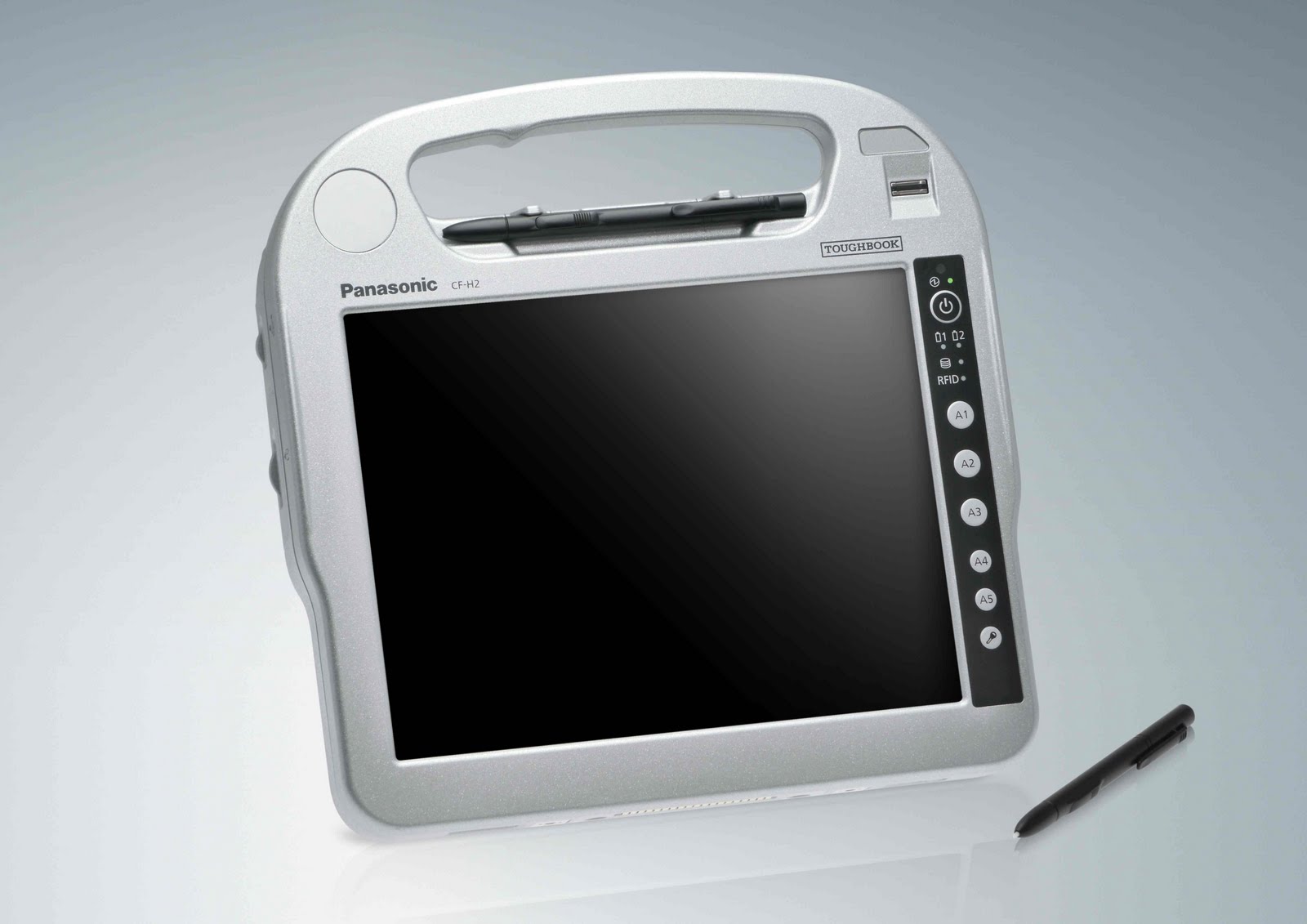
The industry's most rugged handheld tablet PC

The new rugged Panasonic Toughbook® H2 handheld tablet PC runs a full OS (Windows(R) 7 Professional) and is the ultimate productivity tool for mobile workers. With superior ergonomics, a brilliant 10.1" sunlight-viewable LED screen capable of up to 6000 nit in direct sun and sealed all-weather design, the H2 lets you work virtually anywhere. Designed with a fast Intel® Core™ i5 vPro™ processor*, magnesium alloy chassis encased in polycarbonate, the IP65 and MIL-STD-810G certified(1) Toughbook H2 delivers a complete range of embedded wireless features including Wi-Fi, Bluetooth® and optional 4G LTE (Fall 2011) or Gobi™2000 3G mobile broadband. Add to that hot-swappable twin batteries for maximum uptime, ports such as USB, serial and ethernet, optional integrated barcode and SmartCard readers, and you’ve got a handheld tablet PC that is unmatched in the field.
toughbook h2 pic1
Unique Technology
The Toughbook H2 was created to be the kind of tough slate computer that helps busy mobile workers do their job efficiently. With a dual touch display, stylus data entry, sunlight-viewable display, Wi-Fi and Bluetooth® wireless communications functions, it is effortless to update patient data on the go. In addition, the H2's special rugged design means it is durable and easily sanitized.
TransflectivePlus Display
The Panasonic Toughbook H2 features a TransflectivePlus display, which in addition to an adjustable LED backlight, harnesses the rays of the sun by using an internal reflecting layer to illuminate the screen and can generate up to 6000 nit of LCD brightness in direct sunlight for superior viewability. The supplementary LED backlight can deliver as little as 1 nit, useful in dimly lit areas or up to a full 500 nit, which is comfortable in normal viewing conditions. This brilliant and exclusive technology comes standard with anti-reflective and anti-glare screen treatments plus a circular polarizing filter for an unparalleled outdoor viewing experience. The Toughbook H2 is also equipped with an ambient light sensor to detect bright lighting conditions and automatically disable the LED backlight to conserve power, thus extending battery life when outdoors.
Hot-Swappable Twin Batteries
In your line of work, every second counts. The H1 Field is equipped with an impressive 6.5 hours of battery life, which can be extended further by taking advantage of its hot-swappable twin battery design. With its hot-swappable design, the H1 Field comes standard with two identical batteries. This design can provide unlimited hours of use by giving users the ability to change one of the H1 Field's batteries with the unit still on. By avoiding the need to shut down to change a battery, critical time can be saved.
touchbook h2 back and front view
Ergonomic Strap and Dome Hand Support
The Toughbook Toughbook H2 was also designed to be used while standing during shifts whether indoors or outdoors. That's why it features an ergonomic strap and dome hand support.
This strap is wider in the middle and uses a urethane material, which provides elasticity, as well as a comfortable fit that is not too tight. In addition, the bottom of the PC is designed with a contoured dome that envelops your palm to provide the support you need for comfortable long-term use. The dome on the bottom of the PC was designed with the hand in mind as the hand forms a cup shape naturally when it is relaxed. These innovative designs enable the PC to be held for long periods without fatigue.

Fanless Design
Engineered to be used outdoors, the H2 employs a smart construction to protect it from moisture and debris. A fanless design means there's no need for a vent, while locking port covers protect the interface connectors. So whether it's exposed to spills, humidity or dusty environments, the H2 can survive it all.

Magnesium Alloy Chassis
The H2 strikes just the right balance between ruggedness and mobility. Its body is fabricated from lightweight but extremely strong reinforced polycarbonate that has 200 times more impact strength than glass and 6 times more than acrylic resin. Inside, the PCB is protected by a magnesium alloy plate that has been proven to withstand 3 foot drops. Weighing in at just 3.5 pounds, the H2 is light enough to carry around, yet strong enough for all those bumps along the way.
touchbook h2, pic 3
Reinforced Locking Port Covers
Computer sockets are direct openings that invite interior damage from water and particles. To decrease this risk, Panasonic designed a secure interface cover specifically for the Toughbook H1. Generously coated with a durable resin to ensure firm contact and excellent sealing, the cover features a catch that slides it into position and locks it into place which prevents the cover from opening accidentally.

Gobi™ Mobile Broadband
With new Gobi™ mobile broadband technology from Qualcomm, Panasonic Toughbook® mobile computer users can connect globally using Panasonic's next-generation wireless computers. Users can take advantage of high-speed 3G mobile internet networks to increase productivity and reduce downtime, while securing a reliable connection virtually anywhere a cell phone can be used. And, with the Panasonic Carrier Selection Application (CSA) software platform, users are able to select or change to the best carrier for any geographic area.
The Toughbook ROI Evaluator
The Toughbook ROI Evaluator is an application that objectively analyzes the costs/benefits of mobile computing solutions from different vendors. This vendor-neutral application is designed to help purchasing managers choose a solution that provides the best ROI (Return On Investment) and TCO (Total Cost of Ownership) based on their unique business needs. It performs a detailed cost analysis of up-front purchase cost, repair expenditures and downtime, specific product features, value of ownership, disposal, and much more.
»»  read more
Related Posts .